
Watch someone turn on an old laptop with a traditional hard drive, and you’ll genuinely witness that painful, familiar wait, the spinning loading circle, the frozen desktop icons, the general feeling that your computer is thinking hard about whether it actually wants to start working today. Now watch that same person switch to a laptop with an SSD, and Windows genuinely boots in seconds rather than minutes. This exact difference genuinely explains why storage type matters far more than most Indian buyers realise when shopping for a laptop or upgrading an existing one.
Here’s why this comparison genuinely deserves careful attention rather than treating storage as an afterthought behind RAM and processor specs: SSDs and HDDs genuinely serve fundamentally different purposes, one prioritises speed and reliability, the other prioritises raw storage capacity at the lowest possible cost, and understanding which genuinely matters more for your specific use determines whether your computer feels responsive or frustratingly sluggish every single day.
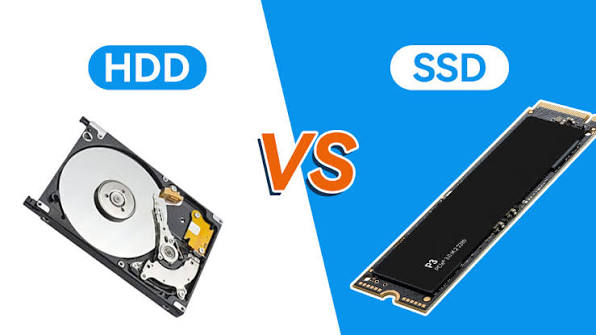
Why SSDs Genuinely Deliver Dramatically Faster Performance
This is genuinely the single most important difference between these two storage types. An SSD stores data electronically on flash memory chips with no moving parts, while an HDD relies on spinning magnetic platters and a physical read/write head that must mechanically move to access data. This fundamental architectural difference genuinely means SSDs are up to 5 times faster than HDDs, with NVMe SSDs specifically reaching speeds up to 7,000 MB/s compared to a traditional HDD’s modest 80 to 160 MB/s.
This speed advantage genuinely transforms everyday computing in ways you’ll notice immediately, faster boot times, near-instant application launches, and considerably smoother multitasking, exactly why SSDs have genuinely become the standard storage choice for virtually every new laptop and desktop sold today rather than remaining a premium upgrade option.
Why HDDs Genuinely Remain Unbeaten on Cost-Per-Terabyte
It’s genuinely worth being fair to HDDs here, since they haven’t become entirely obsolete despite SSD’s speed dominance. A 4TB internal HDD costs roughly ₹6,500 to ₹10,000, while an equivalent 4TB SSD runs considerably more, sometimes ₹20,000 to ₹55,000 depending on the specific type. For high-volume archival storage, old movies, years of accumulated photo libraries, server backups, or surveillance footage, HDDs genuinely deliver considerably more storage space per rupee, and this cost advantage isn’t projected to disappear anytime soon.
This means speed isn’t genuinely the constraint for these specific use cases, capacity per rupee is, and HDD economics genuinely still rule for anyone building a home NAS, setting up backup archives, or storing massive amounts of data that sits largely untouched rather than being accessed constantly throughout the day.
Why Gaming Genuinely Benefits Considerably From SSD Storage
This matters enormously for anyone building or upgrading a gaming PC or laptop. SSD storage reduces game load times, eliminates the frustrating texture pop-in common in open-world games, and removes stutters caused by slow data streaming from a traditional spinning drive. Modern AAA games are increasingly designed around fast storage technology, meaning an HDD genuinely becomes a bottleneck holding back your entire gaming experience, regardless of how powerful your graphics card or processor might be.
For gaming specifically, using an NVMe SSD for your operating system and currently active games, then adding an HDD only if you have a large existing game library you don’t want to constantly re-download, genuinely represents the smartest, most cost-effective approach most pre-built gaming PCs already default to.
Why Durability Genuinely Favours SSDs for Portable, Mobile Use
This is a genuinely underappreciated practical advantage worth understanding. Laptops get dropped, sit in backpacks vibrating on moving trains, and generally experience considerably more physical movement and jostling than a stationary desktop computer. SSDs genuinely survive this kind of physical stress far better than HDDs, since there are no moving mechanical parts that can genuinely be damaged by sudden impacts or vibration. This durability advantage genuinely matters enormously for students and professionals carrying their laptops daily through Indian commutes, buses, and crowded trains, where an HDD’s mechanical fragility genuinely poses real risk to your stored data.
Understanding the Genuine Lifespan Difference
SSDs can genuinely be expected to last 6 to 8 years under normal use, while HDDs typically have a shorter lifespan of 3 to 5 years, reflecting the genuine wear that mechanical components experience over time compared to solid-state electronic storage. This longevity gap genuinely adds to SSD’s overall value proposition beyond just speed, since you’re genuinely getting a storage device that lasts longer alongside performing considerably better throughout its lifetime.
Why Combining Both Genuinely Delivers the Smartest Setup for Many Users
This is genuinely worth knowing as the practical middle-ground approach many pre-built systems already default to. Pairing a smaller SSD, 256GB to 500GB, for your operating system and actively used programs with a larger HDD, 2TB or more, for bulk storage genuinely gives you the best of both worlds, SSD’s speed advantage for the programs you actually use daily, combined with HDD’s cost-effective bulk storage for files, media, and archives you access less frequently. This hybrid approach genuinely makes sense for anyone wanting fast everyday performance without paying SSD prices for storing terabytes of rarely accessed files.
Making the Genuinely Right Choice for Your Specific Needs
If you’re buying a new laptop for everyday use, gaming, content creation, or professional work, an SSD is genuinely the clear, correct choice, even a budget SATA SSD delivers a dramatic improvement over any HDD for daily computing tasks. If you’re specifically setting up a home server, NAS, or backup archive where you’re paying for capacity rather than speed, an HDD genuinely remains the smarter, more economical choice for that particular application.
Frequently Asked Questions
Q1. Is it genuinely worth upgrading my old HDD laptop to an SSD instead of buying an entirely new laptop?
Yes, genuinely, replacing an HDD with an SSD is one of the most noticeable, cost-effective upgrades you can make, an older laptop from 2015-2019 that’s groaning on a hard drive can genuinely feel like a brand new machine after switching to SSD storage.
Q2. Do I genuinely need an expensive NVMe SSD, or is a basic SATA SSD good enough for everyday use?
For simple tasks like browsing, office work, and basic gaming, a good SATA SSD already offers a huge leap over HDDs, NVMe SSDs genuinely matter more specifically for video editing, software development, and situations where you’re regularly moving large files.
Q3. Why do HDDs still exist if SSDs are genuinely so much faster in every way?
HDDs genuinely remain the better choice specifically for high-capacity, cost-sensitive storage like backup archives, NAS systems, and bulk media libraries, where you’re paying for terabytes of space rather than speed, and this cost-per-terabyte advantage isn’t expected to close for years.
Q4. Should I combine an SSD and HDD in the same computer, or choose just one?
Combining both genuinely makes sense for many users, using a smaller SSD for your operating system and frequently used programs while adding a larger HDD for bulk storage of files and media you access less often, giving you speed where it matters and affordable capacity where it doesn’t.